Quickstart
Run the disposable Docker playground and inspect assembled cross-source operational state in one guided flow
Run one disposable tapstate data path without installing the CLI or preparing your own databases. The playground captures MySQL orders and PostgreSQL shipments, assembles them into one order document, and materializes the result in MongoDB.
When you finish, you will have a running order_pipeline, a checked initial
result in MongoDB, and a web session for exploring the pipeline.
This quickstart is an evaluation environment, not a server installation or production deployment. Use sample data only.
Why assemble this state
The sample keeps order details in MySQL and fulfillment records in PostgreSQL. Neither database can join a table in the other, so an application that needs a complete order would otherwise query both systems and assemble the result on every request.
Tapstate declares that relationship once. An initial snapshot builds the current order state, and CDC keeps the same object fresh when either the order or one of its shipments changes.
From two databases to one current order
Real playground values; the complete document appears in the verification step below.
Source records
MySQL
ordersid · customer · amount
1 · alice · 10.00
PostgreSQL
shipmentsid · order_id · carrier · status
1 · 1 · dhl · delivered
2 · 1 · ups · in_transit
Single-node server
Capture & transform
nest
shipments.order_id
matches
orders.idviews.order_state
Managed MongoDB state
id1
customeralice
amount10.00
shipments · 2
#1 · dhl · delivered
#2 · ups · in_transit
Before you begin
You need:
- macOS or Linux;
- Docker with the Compose plugin running;
curl;- several GB of free Docker storage.
Confirm Docker is available:
docker info
docker compose version
You do not need to install the tapstate CLI. The
script downloads the tools, connector artifacts, and the
Quickstart stack into a disposable tapstate-demo directory. The published CLI
and server assets are selected from the same release path.
1. Start the playground
Run the published quickstart script:
curl -fsSL https://install.tapstate.dev/demo | shThe script starts MySQL, PostgreSQL, MongoDB, and a tapstate server. It then:
- creates a local administrator;
- registers the MySQL, PostgreSQL, and MongoDB connectors;
- applies and discovers both source connections;
- applies and starts
order_pipeline; - waits for the assembled initial state.
The command can take several minutes the first time while Docker downloads the images.
For an unreliable connection, save the script before running it so you can inspect and rerun the same file:
mkdir -p tapstate-demo
cd tapstate-demo
curl -fL https://install.tapstate.dev/demo -o quickstart.sh
sh quickstart.sh
The script retries interrupted asset downloads and keeps an incomplete transfer
as a .part file. Run the same command again to resume it. A failed transfer
does not count as a successful setup.
2. Confirm the result
A successful run ends with this line:
quickstart: 5 orders from MySQL, each carrying its shipments from PostgreSQL -- 6 of them, in one object per orderThe order and embedded-shipment counts are the quickstart's success condition.
If a setup command fails, the script prints the CLI diagnostic and exits. It does not continue to the snapshot check or report an empty target as success.
3. Open the web application
On the Docker host, open http://127.0.0.1:8080 in your browser. The Playground
binds that port to the host's loopback interface. From another computer, keep
this SSH tunnel open and visit http://127.0.0.1:18080 locally:
ssh -N -L 127.0.0.1:18080:127.0.0.1:8080 user@linux-hostReplace user@linux-host with your SSH login for the Docker host.
Sign in as admin with TAPSTATE_ADMIN_PASSWORD from the generated
tapstate-demo/.env file. Keep that file private.
The sample is already configured and running. You do not need to create a connection, author a workspace, or start another pipeline to complete this quickstart.
Under Data Sources, open orders_db and select orders to inspect its
discovered columns. fulfillment_db contains the shipments table.
In Pipelines, open order_pipeline to inspect the data path. The two sources
feed assemble, then order_state. Open Monitoring to see the current
status and metrics; Logs shows recent pipeline messages.
In Views, open order_state and select Documents to browse a sample of
its stored documents.
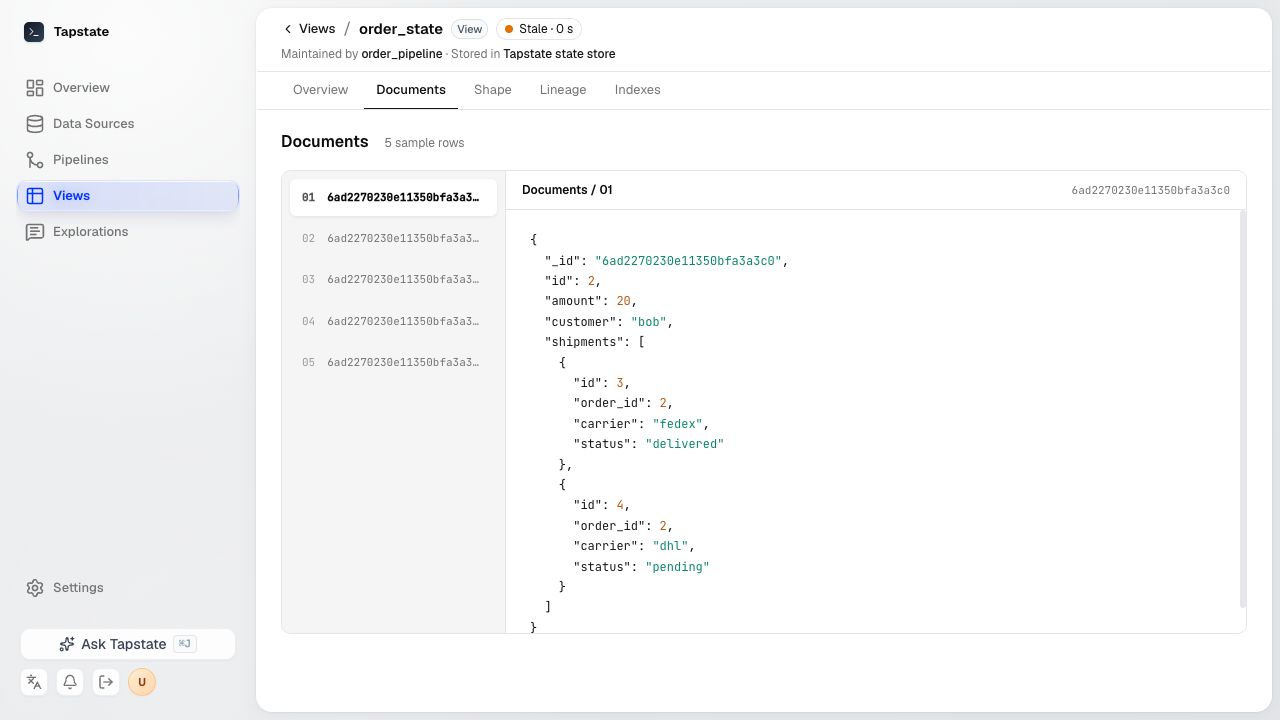
For a complete creation workflow, see Build a pipeline.
4. Understand the result
The setup script checks the result in MongoDB (views.order_state) before printing the success line:
5 orders and 6 embedded shipments.
For order 1, the sample result has this business shape (MongoDB's generated
_id is omitted):
{
  id: 1,
  customer: "alice",
  amount: Decimal128("10.00"),
  shipments: [
    { id: 1, order_id: 1, carrier: "dhl", status: "delivered" },
    { id: 2, order_id: 1, carrier: "ups", status: "in_transit" }
  ]
}
The order fields come from MySQL; the shipments array comes from PostgreSQL.
The web application lets you inspect the pipeline, metrics, logs, and a sample
of stored documents. The setup script verifies the initial result directly in
MongoDB before reporting success.
Next steps
- Explore the order-state demo to change both source databases and watch the document stay current.
- Build a pipeline with your own connections in the web application.
- Learn how connections and connectors and capture modes fit the pipeline.
- Prepare an external system with its connector guide.
- For scripts or AI integrations, use the optional CLI or MCP gateway.
- Use Troubleshooting if the success line or assembled document does not appear.
Keep, stop, or remove the playground
Keep the playground running while you explore the order-state demo or prepare a workspace for your own MySQL or PostgreSQL source. Confirm that the tapstate server can reach the database before applying it. This remains a disposable evaluation environment; use sample or non-sensitive data only.
To pause it and preserve the sample data for later, run this from
tapstate-demo:
docker compose stopResume the same environment later with docker compose start.
When you no longer need the playground, remove its container data and start clean next time:
docker compose down -vThis permanently removes the sample MySQL, PostgreSQL, and MongoDB volumes. It does not remove the files or downloaded images.